
Run your whole field team from one screen.
Calls, people and a live map on one dispatch desk. Your team responds from their phones, and the records, reports and timecards file themselves.
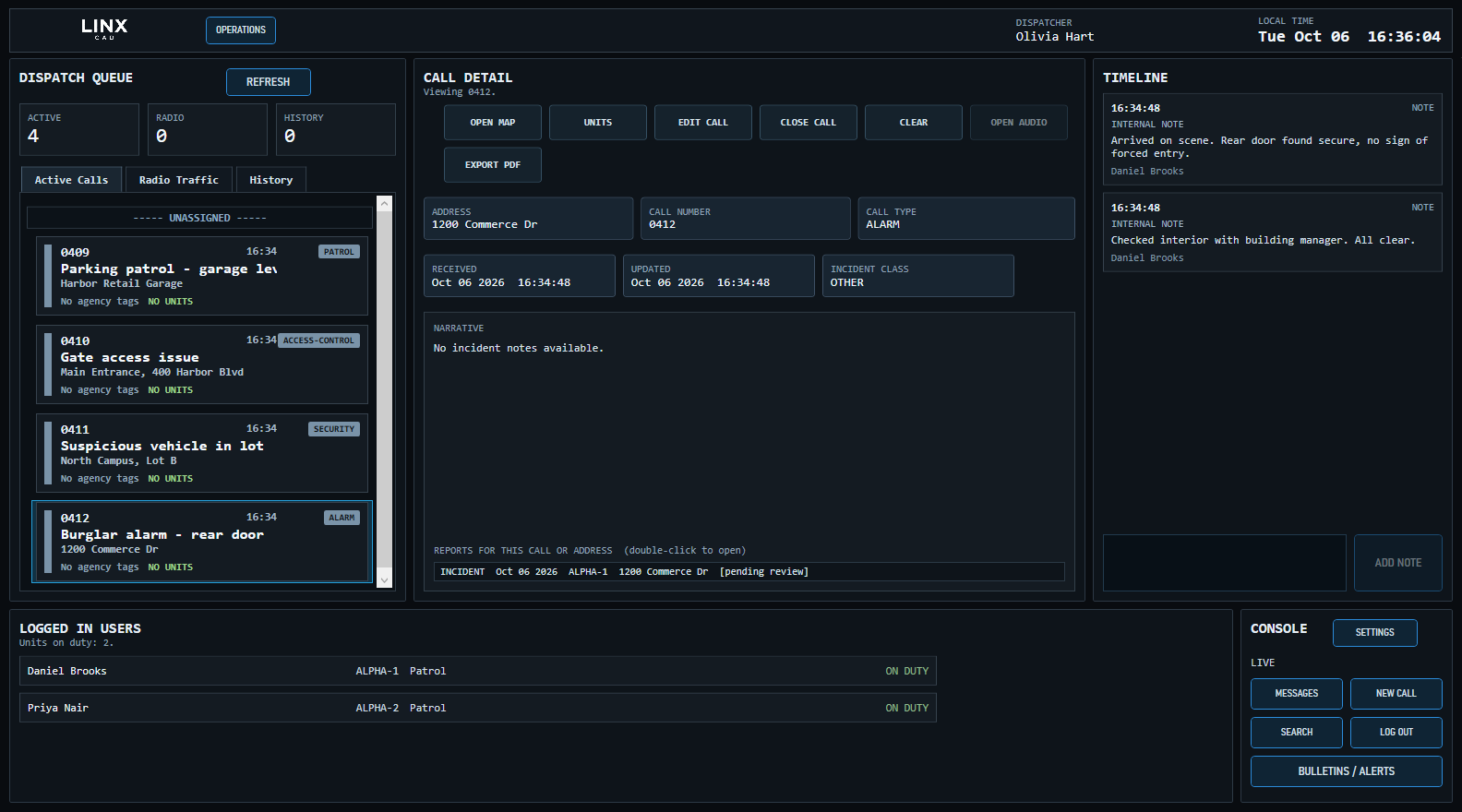
One system, three ways to use it
Everyone works from the same live record, each from the place that suits their job.
The dispatch desk
A Windows app that shows the whole operation at a glance: a live call list, a map of calls and people, messages and a bulletin board.
The field app
Android phones and tablets. Respond with one tap, get directions, fill in forms and reports on the spot.
The company portal
Add people, approve devices, review reports and timecards, see statistics, set up your forms and logo.
What happens to one call
- The call comes inPick the call type from your own list. Addresses search your service area first.
- Someone is put on itDispatch attaches them, or they attach themselves if you allow it.
- On the wayOne tap on the phone. The map follows them.
- At the sceneForms filled in on the phone, once, on the spot.
- ClearedOne more tap. Dispatch sees it without a phone call.
- Reviewed and filedA supervisor approves, returns or rejects. The timecard is built for you.
Your data stays yours
Every company is isolated at the database level. Administrators use two-factor sign-in, devices must be approved, and support access is temporary and logged.
Questions
Do I pay per user?
No. Each plan has a flat price with a generous user and location limit. If you are larger, we quote a custom plan.
What phones do my employees need?
An Android phone or tablet. The dispatch desk runs on a Windows computer, and owners use the web portal from any browser. There is no iPhone app today.
Can my employees use their own phones?
Yes. The app installs on the phone and your administrator approves the device. The phone shares its location while someone is signed in on shift, and you can remove a device the moment someone leaves.
What information do you store?
Your employees' accounts (name, username, role, and an email or phone number if you add one), and everything your team records: calls, notes, reports, logs and timecards. That can include details about members of the public, such as names, addresses and plates, depending on the forms you use. If you turn on photos or signatures, those are stored too. A phone's location is kept while someone is on shift, and the location history is deleted after 7 days. Passwords are stored as one-way hashes. LinxCAD is not built to hold medical records, and we do not sign a HIPAA business associate agreement unless a separate written agreement says so. Our privacy policy has the full list.
Who can see our data?
Your own people, within the roles you set. Nobody at another company can. Our staff can see your data only through temporary access that you approve and can revoke, and every use is logged.
Does it work without a signal?
Not yet. With no connection the app shows the last calls it received, but it does not work offline, so we do not promise offline use.
What does the dispatch desk run on?
A Windows computer. The app installs without administrator rights and updates itself in the background.
What if we need help?
Email support is included on weekdays, and extra help, training and custom work is available by the hour. Visit the support center for guides, or see our service level agreement for the targets.
Can we try it first?
Yes, two ways. You can click through a small demo right here in your browser: Try it gives you a desktop computer and a phone side by side, with sample data for a security or a towing company. It works on a laptop or desktop computer, and nothing you do in it is saved or sent anywhere. Or request a demo and we will run a walkthrough with sample data for your type of company and get in touch.

See it with your own kind of team
A short walkthrough, then a quote. From $1,500 per six months plus $150 a month hosting.
Request a demo